Every time I look at my netbook I keep thinking I've got a new machine, and an expensive one at that, but I haven't, I just installed the new Ubuntu 9.10 (code named Karmic) Netbook Remix on it. The upgrade cost me nothing, not even £25, and I've still got an operating system with designer good looks, a new user interface that even more elegant and user friendly than before. Installing it is easy and everything just seems to work out of the box. The changes in this new release of Ubuntu though are more than just skin deep, and show signs of the cloud based future ahead for computing.
kubuntu
Last night I had the pleasure of popping in to the Ubuntu Jaunty release party in London. The venue, despite being quite large, was utterly packed with people associated with the Ubuntu community either by working on it in some way or just being users. It is amazing to think that this was only one of a hundred release parties taking place worldwide for this latest release of Ubuntu, which has a six monthly release schedule. The excitement is justified, the latest release of Ubuntu, version 9.04 (or to use its development name Jaunty) is faster, slicker and has more cutting edge features than its predecessor, Ubuntu 8.10. The project has lived up to its slogan of “Linux for human beings” by producing an operating system that is simple to run and just works (mostly ;)).
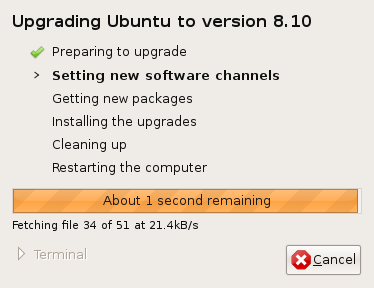 As you might know,a new version of Ubuntu was released a few days ago adding some new features and polish to this already fine operating system, and I've been trying out not only Ubuntu itself, but also some other members of the Ubuntu family of operating systems. You can find a list of features on the official announcement here: http://www.ubuntu.com/news/ubuntu-8.10-desktop. What always remains striking here is that Ubuntu preserves the tradition in Linux of offering users real choices for their computing experience, the user is in change of their computer and can compute how they want to. Ubuntu was always traditionally aimed at the desktop, then a server product was developed, and now a lot of work is being carried out into producing mobile versions of Linux. As this is an open operating system it is possible to mix these experiences together to your requirements. I upgraded from Ubuntu 8.04 on my laptop using an alternate install CD and found the whole experience was very smooth, once I put the CD in, Ubuntu asked me if I wanted to upgrade and it worked out what was required and happily upgraded.
One of my aims for this year is to learn the Python programming language. Why? Well it seems to be cropping up all over the place. If you own a Linux machine or an Apple Mac, chances are it is already installed. Google recently made it the primary language for their AppEngine platform.
Something we do have a wide choice of in Ubuntu Linux (and on many other Linux platforms) is virtualisation software. Previously in this blog I've covered VirtualBox, which was recently acquired by Sun Microsystems.
Along with many of my OU colleagues, I have been using Twitter to regularly post my 140 character thoughts and share them with people who follow me. It has become a very popular service, and despite the simple nature of its core service all sorts of innovative add-ons have been dreamt of to enhance its functionality, Twitterholics gives a good sense of what is being developed. Twitter can be updated through its website or an increasing number of clients that are being developed for it. One of these clients is KDE Twitter, which I first saw on a screenshot on the Kubuntu website, but had a bit of trouble it tracking down. KDE Twitter is a Plasmoid, a widget that can be added to the KDE4 desktop.
I've got the new Kubuntu 8.04 KDE4 Remix running now on my laptop and it is looking really good. I really like the new visual design and it is great that the Kubuntu project team made a release featuring KDE4 available on top of everything else they have had to do to get the main release of Kubuntu out. Up to now I have been running KDE3 and experimenting a bit with KDE4 on a virtual machine, but now I'm making the move full time.
Congratulations to the Ubuntu community on the release of Ubuntu 8.04! I am currently downloading a copy of Kubuntu 8.04 KDE4 Remix and preparing to make a jump from KDE3 to 4, which should give a modern looking computing experience anyway. I've been playing with the beta version of the Remix CD for a while now, and KDE4 seems to have improved quite a lot since I first blogged about it back in January.
I've just been installing the new Kubuntu KDE4 Remix Beta on an old Acer L100 Media Centre using the Alternative Install CD (so I can do a text mode install) as I only have an old CRT TV attached to it. When I tried to boot from the CD it looked like the installer picked a display mode that didn't work with the TV as the picture lost stability and was unviewable. I couldn't find the usual options to change the screen mode, but found that this worked to override the screen mode: