It's a sad fact that most of the mobile operators, in the UK at least, sell their mobile broadband solutions with no support for Linux computers, despite the popularity of this operating system on netbooks.
huawei e169g
Note to Ubuntu and Easy Peasy users: Your Huawei E169G should now work out-of-the box with later versions of Ubuntu (8.10 onwards) and derivatives. Lots of other modems work too, like the E160G.
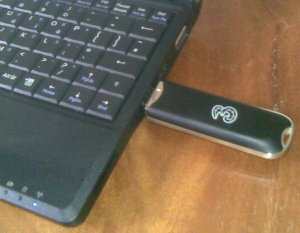 Note to Ubuntu and Easy Peasy users: Your Huawei E169G should now work out-of-the box with later versions of Ubuntu (8.10 onwards) and derivatives. Lots of other modems work too, like the E160G.
Update: I've attempted to automate the steps above by using a package, have a look at: Huawei E169G - the easy way
Yesterday I treated myself to a new mobile internet "dongle" to go with my Asus EEE PC. I decided to go for the Huawei E169G usb modem as it matches my black EEE, however there is a small problem with getting this device to work straight away. The problem is that the E169G is a composite device, which basically means that it will ask as a USB memory stick until it is sent a command to tell it to be a modem. The EEE doesn't know about this so you can't use it straight away as a 3G modem in the connection wizard. Fortunatelty, back in April Dale Lane documented in his blog how to send the modem the right command to be able to use it wil the EEE, his blog post on the topic is worth reading as it explains the background to the issue. After experimenting with my friend Keren Mills' E169G (thanks Keren!) to check that I could get this method to work I took the plunge and got my own one. Following the instructions on Dale Lane's blog I was able to send some commands manually to the unit to get it to switch but what I really wanted to do was to get the EEE to recognise the device automatically so I can start a 3G connection without having to run any commands in the terminal. Fortunately this is possible.