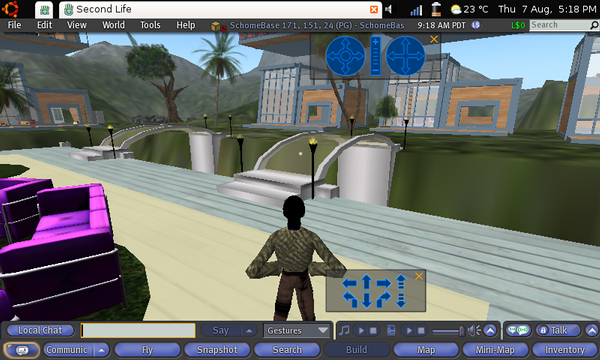
 Back in December 2007 I installed SecondLife on a factory-standard Asus EEE PC to see if it would work or not, it did, even with just 512MB memory installed, but it was a little slow. So since adding a bit of extra power to my EEE by upgrading it to 2GB RAM and installing Ubuntu on it, I was curious to see how this might improve the experience. The SecondLife client has also been updated recently, the version I tested with is version 1.20.15.92456 which I downloaded directly from the SecondLife web site. The results were pleasing, the client was usable, the graphics more vibrant and details than before, as you can see from the picture, even with low graphic detail selected the detail was quite impressive.
Once you download the file, all you need to do is untar (extract) the files by entering: tar xvjt [downloaded file name], I then moved it to the /opt directory. The software comes ready to run, so no compilation is necessary. You might want to add an icon to your menu though, use the Main Menu program to do this (System->Preferences->Main Menu on regular Ubuntu or Settings -> Main Menu on Netbook Remix), an icon is provided too. Then when you launch the application for the first time you will get a message telling you that your system is not up to the recommended minimum specification for the client.
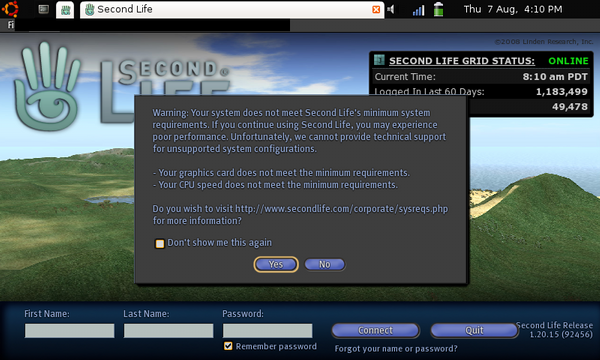
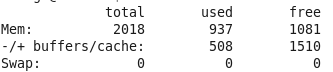 Basically it is just telling us that the CPU and graphics card aren't quite up to the specification required, the client still works, but you will notice that the rendering is not as smooth as using SecondLife on machines with 3D graphics chipsets or higher powered CPUs. Once you get the client up and running, you'll need to reduce the amount of space it uses for a disc cache, set this by going to Edit -> Preferences -> Network, you'll see the default value is 500MB! We don't want that on a 4GB disc really, so reduce this down to about 20MB. You can change the location of the disc cache so I guess you could store it on a high speed SD card, not sure how this would impact performance, but on a removable card you could have quite a large cache. When up and running it was noticable that the extra memory was making a real difference, the client was much more responsive that before and the graphics more detailed. Running free -m to find the memory in use revealed that 937MB was being used, so there was still bags of memory left.
So SecondLife is not perfect on the EEE, but even an inexpensive memory upgrade improves the experience greatly, meaning we mustn't be far off from having netbooks like the EEE being able to provide access to fully immersive environments like SecondLife. There are many potential uses for this, not long ago I was fortunate enough to be invited along to a tutorial for an Open University course that was taking place in SecondLife, and it was a great experience. Before I wasn't sure about the educational possibilities for the technology but I can now see being in an online environment that can invoke that suspension of reality feeling that can be found in games and films could be very useful, a person gets to be fully immersed in the educational experience, almost leaving their everyday (1st?) life behind for a short while and can interact with other students and an educational environment. Would this make someone feel more involved, more connected, less likely to give it all up? I don't know, but it is worth finding out (for more information have a look at the MOOSE project). What might be a bigger driver for netbooks to develop their graphics capabilities though might be gaming. Asus recently announced that they are to bundle new gaming controllers with certain models of the EEE (the EEEBox maybe?). It would be great to see an EEE with a 3D graphics chipset built in, this would make it a machine capable of supporting a proper gaming experience and fully immersive environments like SecondLife.
Re: Running SecondLife on an Ubuntu-powered EEE
I have a ASUS EEE 900 and installed the Ubuntueee 8.0.4.1. When I run SL, I get an error about my graphics card does not meet recommended specifications. I have read that it is a color depth issue, but the suggested fixes don't work.
What are your suggestions?
Re: Running SecondLife on an Ubuntu-powered EEE
I keeping getting graphic card errors, gave up in the end, good read
Re: Running SecondLife on an Ubuntu-powered EEE
My friend told me about this the other day and I've been looking to see why the error shows up on my one. Thanks for the information.
Re: Running SecondLife on an Ubuntu 9.04 NBR / Acer Aspire One
I am able to run but it causes a total pc freeze for me if i move in a primmy place.
Runs ok in a desert island though.
Can anyone relate ?