 A little while ago I started reading up on Notube, an EU funded project that aims to explore how technology such as Linked Data can be used with televisions to (amongst other aims) produce personalised content. Inspired by this idea I started thinking about a small example that would build upon my earlier blog post How to use Linked Data on the Samsung Internet@TV platform to produce a personalised view of Open University Podcasts. In order for the example to be useful it would need to use data for the personalisation that was easy for the user to supply using just a remote control. I've got as far as producing a simple prototype that hopefully shows some of the potential of this technology.
settopbox
 Although I have been using Boxee for quite a while both as a user and developing apps the closest I have come to seeing a Boxee Box was holding a prototype in my hands, and it wasn't even switched on. So it was a great opportunity to take up PR agency 33 Digital's open invitation to go see one in operation in their offices in London. They are representing Dlink, the hardware manufacturer for the Boxee Box on the social media scene and run the @dlink_boxee_box Twitter account. It was a great chance to have a play with this innovative bit of hardware and explore what it can do.
I did a fresh install of Boxee and the newly released Ubuntu 10.04 LTS on my Acer Aspire Revo today. The process has not changed significantly since I wrote my post How to install Ubuntu 9.10 and the Boxee Beta on an Acer Aspire Revo (including 64 bit option) back in January. You can pretty much follow these instructions to get everything up and running. One minor difference is in alsamixer where the entry formally known as “IEC958 1” now seems to be labelled “S/PDIF” (see below for screenshot) - unmute this as before. I used the recently released Boxee Beta version 0.9.21.11487 which works with Ubuntu 10.04, at the time of writing the Boxee site doesn't state this. It is also possible to integrate Boxee with the new Ubuntu One Music Store.
Back in August last year I wondered aloud whether it was time for a remix of Ubuntu aimed at media centres and set top boxes. I was not the only one thinking along these lines it seems! In April 2009 “Element” was founded by Kevin L. Thompson with the aim of producing an operating system specially designed for media centres. They have just released version 1.0 of Element OS, a new Linux distributon based on Ubuntu designed around the concept of the ten foot user interface (a user interface you can see and operate on your TV from across the room). It was time to make myself comfortable on the sofa and see what this new remix is all about.
** Update 3rd May 2010: The instructions here also generally work for Ubuntu 10.04 LTS, for notes specific to this version see: Boxee and Ubuntu 10.04 LTS on the Acer Aspire Revo ***
A lot has happened since I wrote my post back in June about setting up Ubuntu and Boxee on the Acer Aspire Revo; a new version of Ubuntu has been released and today (7th January 2009) the new beta version of Boxee was officially released to the public. The new version is a major overhaul and represents quite a different, enhanced user experience from the alpha. So I thought I would do a new version of the post to reflect these changes. Fortunately, Ubuntu 9.10 (Karmic) has introduced many changes that make getting the Revo up and running much easier than under the previous release of Ubuntu.
** UPDATE 7th January 2009 ***
See my new post for details on how to install the Boxee Beta and Ubuntu Karmic on the Revo:
How to install Ubuntu 9.10 and the Boxee Beta on an Acer Aspire Revo (including 64 bit option)
The details below are now out of date, but are still useful if you wish to install Ubuntu 9.04 (Jaunty) on a Revo.
***
The Revo is a very new piece of hardware and features some cutting edge technology so installing Ubuntu on it is not completely straightforward as not many people own these units and have had a chance to make them work out of the box with this very popular Linux distribution. However, it can be done and the unit makes a fantastic Ubuntu machine and if you add Boxee a great entertainment centre for your living room. The first thing to do is to put a copy of the Ubuntu 9.04 desktop live CD image on a USB memory stick. Do this by visiting:http://www.ubuntu.com/getubuntu/download and selecting the 32 bit desktop edition. Once downloaded you copy it to a USB stick by using the USB Startup disk creator located under System → Administration. The task of installing centres around three areas: getting Ubuntu on the machine, getting the graphics to work (properly) and getting the sound to work (at all).
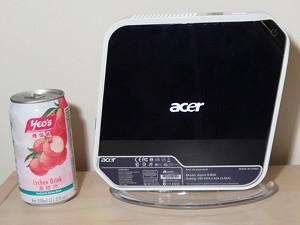 At long last after some delays I have finally received my new nettop and can now start properly experimenting with a device so quiet it can be used in the living room without the interruptions of noisy fans and overheating hardware. If you haven't heard of nettops then that might all be about to change. These are the desktop equivalent of netbooks.
If you have made the move to digital TV you might be familiar with the “red button” service, the idea of pressing the red button on your remote control to take you into digital interactive services. These are usually the modern equivalent of teletext from the old analogue days but can be a little more adventurous with services such as news or sport “multiscreen” services where you can choose a video you want to watch. Various technologies make these services possible, they all include ways to display information sent over the airwaves and also provide ways to show information provided over the Internet (if available on the set top box you are using). If you are using Ubuntu (or any Linux machine) you can get hold of software that will allow you to experiment with an open standard in this area called MHEG-5.
In many houses the TV and broadband line can be found only inches apart and in most cases no connection is yet made. The Internet had the power to bring about a revolution in the choice of programming available, instead of scheduled streams of programming that we have no control over we will be able to pick and chose what we want to watch from thousands of producers.