It already looks like 2012 will be an exciting year for Internet connected TVs with a multitude of announcements at this years's International CES. One announcement that particularly caught my eye was by Canonical for Ubuntu TV, a version of the popular GNU/Linux based operating systems that will run on TV sets. Running Linux on consumer hardware is of course nothing new, quite a lot of gadgets in the home are Linux based and many people will be using Linux every day without even realising it (a couple of good examples are Samsung TVs and Bluray players and Humax set top boxes but there are many, many others). There is also no shortage of operating systems for Smart TVs. What is interesting about this announcement is the application of the Unity interface to a completely different context - the TV. Canonical have made the source code for Ubuntu TV available so I decided to check it out and take a look for myself.
revo
 Having a nettop like the Acer Aspire Revo running Ubuntu and Boxee is a great addition to the living room. One thing that I have been meaning to do for a while though is add a proper way to shut the unit down from the remote control when I have finished using it. Walking across the room and using the power button just doesn't seem to be appropriate for a set top box experience! I followed the instructions I found on the Boxee forum to add this feature, but instead of changing the Suspend button into a power off button I decided to add a new button to the log out dialogue. Fortunately this was quite a straightforward procedure.
I did a fresh install of Boxee and the newly released Ubuntu 10.04 LTS on my Acer Aspire Revo today. The process has not changed significantly since I wrote my post How to install Ubuntu 9.10 and the Boxee Beta on an Acer Aspire Revo (including 64 bit option) back in January. You can pretty much follow these instructions to get everything up and running. One minor difference is in alsamixer where the entry formally known as “IEC958 1” now seems to be labelled “S/PDIF” (see below for screenshot) - unmute this as before. I used the recently released Boxee Beta version 0.9.21.11487 which works with Ubuntu 10.04, at the time of writing the Boxee site doesn't state this. It is also possible to integrate Boxee with the new Ubuntu One Music Store.
Back in August last year I wondered aloud whether it was time for a remix of Ubuntu aimed at media centres and set top boxes. I was not the only one thinking along these lines it seems! In April 2009 “Element” was founded by Kevin L. Thompson with the aim of producing an operating system specially designed for media centres. They have just released version 1.0 of Element OS, a new Linux distributon based on Ubuntu designed around the concept of the ten foot user interface (a user interface you can see and operate on your TV from across the room). It was time to make myself comfortable on the sofa and see what this new remix is all about.
** Update 3rd May 2010: The instructions here also generally work for Ubuntu 10.04 LTS, for notes specific to this version see: Boxee and Ubuntu 10.04 LTS on the Acer Aspire Revo ***
A lot has happened since I wrote my post back in June about setting up Ubuntu and Boxee on the Acer Aspire Revo; a new version of Ubuntu has been released and today (7th January 2009) the new beta version of Boxee was officially released to the public. The new version is a major overhaul and represents quite a different, enhanced user experience from the alpha. So I thought I would do a new version of the post to reflect these changes. Fortunately, Ubuntu 9.10 (Karmic) has introduced many changes that make getting the Revo up and running much easier than under the previous release of Ubuntu.
This week I have been off work using up a bit of leave, but the weather has been rather autumnal, so it has been perfect conditions to stay in, take a break from work stuff and play some computer games. I thought it would be nice to explore a bit open source gaming on my Ubuntu powered Acer Aspire Revo nettop, not the most powerful machine, but it does feature the Nvidia ION chipset so should theoretically be capable of outputting some decent graphics. Putting open source and gaming together might seem an odd concept, after all modern computer games take vast teams and big budgets to produce, but there are some decent games out there. Additionally, for those interested in games development, open source games provide a unique opportunity to learn from existing code and adapt games to new uses.
** UPDATE 7th January 2009 ***
See my new post for details on how to install the Boxee Beta and Ubuntu Karmic on the Revo:
How to install Ubuntu 9.10 and the Boxee Beta on an Acer Aspire Revo (including 64 bit option)
The details below are now out of date, but are still useful if you wish to install Ubuntu 9.04 (Jaunty) on a Revo.
***
The Revo is a very new piece of hardware and features some cutting edge technology so installing Ubuntu on it is not completely straightforward as not many people own these units and have had a chance to make them work out of the box with this very popular Linux distribution. However, it can be done and the unit makes a fantastic Ubuntu machine and if you add Boxee a great entertainment centre for your living room. The first thing to do is to put a copy of the Ubuntu 9.04 desktop live CD image on a USB memory stick. Do this by visiting:http://www.ubuntu.com/getubuntu/download and selecting the 32 bit desktop edition. Once downloaded you copy it to a USB stick by using the USB Startup disk creator located under System → Administration. The task of installing centres around three areas: getting Ubuntu on the machine, getting the graphics to work (properly) and getting the sound to work (at all).
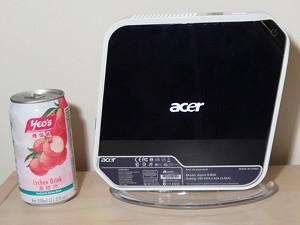 At long last after some delays I have finally received my new nettop and can now start properly experimenting with a device so quiet it can be used in the living room without the interruptions of noisy fans and overheating hardware. If you haven't heard of nettops then that might all be about to change. These are the desktop equivalent of netbooks.