Yesterday I finally received my Raspberry Pi (model B), a small computer designed for educational use that retails at about the £25 mark. I had had mine on order since March and had been reading a lot about it in that time so was looking forward to getting it. The first thing that strikes you about this device is its size, or rather lack of it. The Pi arrived in a box and a padded envelope and yet still fitted through my letter box! So that was the first computer delivery I've had where I didn't need to wait in or find some delivery office to pick it up from. The second thing that struck me is just how raw this machine is. No case, screen, input device or operating system supplied. You need to find these items for yourself. The device is also designed to be plugged into a TV, which might momentarily give it an 80s retro feel. In a time when manufacturers spend so long on polishing products and interfaces and where devices such as mobiles and tablets are starting to bring computing more into a consumer appliance mode of thinking this is quite a shock. This could prove to be a double edged sword.
debian
 I am alone on a small island that is about the size of a roundabout in the middle of a vast ocean. With my ghostly body I look up at the night sky and contemplate what to do next. Maybe I will make the sun rise, build some more land or just read some more of the wiki. I've just installed OpenSimulator (a.k.a. OpenSim), a "3D Application Server". What this means is that it can be used to host "virtual worlds", a bit like SecondLife. In fact you can use the SecondLife Viewer as a client for it. After hearing about at various points for quite a while and finding a really good set of instructions on how to set it up, I couldn't resist having a go, even though creating virtual worlds is a bit of an excursion for me.
Since my last blog post on the Nokia N900 I have been experimenting more with this Linux powered device and thought it was time to go a little further to see what it could do. Just over two years ago I wrote about using the Asus EEE PC as a “server in your handbag” running Apache 2, MySQL and PHP. I could not help wondering if such a feat was possible on the N900, after all it is a Linux machine, a small computer, but running the LAMP stack on a mobile phone? Maemo, the N900's operating system is a derivative of Debian, but the packages needed have not (yet) been ported, however, there was another route: Easy Debian.
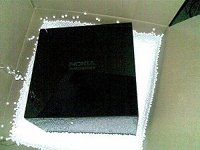 Just before Christmas I had a delivery of a large mysterious black box. There was no obvious way to open it, on the top was engraved “Nokia – connecting people” and on the front a mini usb socket. Also packaged was a USB lead and a card telling me that this was a Nokia “hackerbox” and telling me a web site to visit for clues on how to open it. I managed to connect up the box to my computer and got a terminal session going to “log in” to the box, admittedly I used Google to find out how to get in (as I am not very good at puzzles!). Dramatically, when the right command was issued, the top of the box popped open and a puff of smoke emerged. Inside was a the Nokia N900, a Linux powered mobile phone, accessories, a plastic fox and a nice bit of cake.
A long while ago I wrote about the advantages of Mobile Codes, 2D barcodes that can contain text snippets or URLs that can be interpreted by a camera phone to save the user having to input lots of text on their mobile device. I'm using the term Mobile Codes here to mean both Datamatrix and QR format barcodes.
If you have more than one computer running Ubuntu (or Debian), or maybe you are experimenting with different installations of Ubuntu using something like VirtualBox, you might find yourself using a lot of bandwidth and time when downloading packages from the Internet to update or add capabilities to your machine. By default each installation of Ubuntu will go directly to the Ubuntu download servers to get packages, producing a situation where you are downloading the same file multiple times through your connection to your ISP. There is an alternative to this situation though, you can download the packages through a host on your own network that will act as a cache. The next time any machine wanting that file requires it, the cache will serve its own copy, instead of having to download it again. This is a lot quicker, as the speed in your internal network will be much higher than the speed of the connection to your ISP, it is also a great bonus if you have maximum download allowances as part of your Internet connectivity package. Setting this up is not too difficult, thanks to a program called Apt-cacher.
An area where Linux is sometimes criticised is the level of difficulty expericed by people new to the operating system when installing software. Earlier today, Dr A J Cann posted an example of this criticism when he suggested that Ubuntu should follow the same model of software distribution used Microsoft Windows and Apple Mac OS X of having a downloadable installer file for your desired program.