If you have recently been studying a course on OpenLearn you might have noticed the link to "Knowledge Maps" at the top left. This takes you to a page with resources for a special version of the Compendium software adapted for OpenLearn. The Compendium-OpenLearn software is explained more fully at http://openlearn.open.ac.uk/course/view.php?name=KM. I've been becoming increasingly interested in these sorts of mind mapping programs in the last few months and have found that it has many uses not just for your studies but can be used when you are trying to visualise ideas, or work out structures that help solve problems. This is especially useful in software development as it can be used to discover what structure solutions should take, you can place all of the factors into a map and keep rearranging and revising until you are happy with the results. It is not a new concept, the saying "a picture is worth a thousand words" rather neatly illustrates the idea, there is nothing like seeing a digram of the concept you are working to get a sense of how it all will work. There are a number of software packages around that are aimed at this area, including the excellent FreeMind program, which I hope to go into more detail about in a later blog post.
I've previously rambled about using ultramobiles in the workplace and this sort of application can make a great addition, imagine being able to construct knowledge maps as you meet with your colleagues to illustrate complex parts of your business or use a knowledge map when studying to gain an overview of your topic, particulaly as it is possible to use the EEE as a learning platform. It is possible to run Compendium-OpenLearn on the EEE without modification. There is a version available for Linux that can be downloaded from: http://compendium.open.ac.uk/openlearn/download-linux.html. It is a Java based application so can be run on the EEE using the supplied Sun Java software.
To use Compendium all you need to do is:
- Download the tarball to /home/user/bin
- Open a terminal with Alt+T
- Move to the right directory with: cd ~/bin (the ~ character is a shortcut that goes to your home directory)
- Extract the contents by using: tar xvzf compendium-openlearn-1.5.2.tar.gz
- You can now delete the original download with: rm compendium-openlearn-1.5.2.tar.gz
- To run the software do:
- cd ~/bin/Compendium-OpenLearn
- ./compendium.sh
- After a few moments Compendium-OpenLearn will start and you will be taken through some set up steps
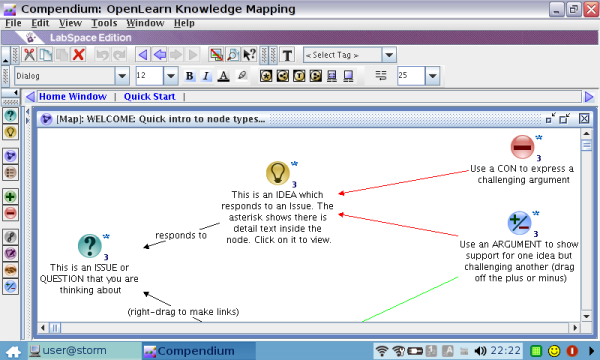
Here is a screenshot of the software in action on an EEE:
Re: Knowledge Mapping with the Asus EEE PC
Mind mapping is really usefull. Somebody would say - why we should use software when thinking, in the sphere where we overmatch computers? I would compare it with calculator. When you try to operate with huge numbers and it take a lot of time and efforts - you are not just a silly man who can't cope with numbers, you just can't keep so much in mind and you need to streamline everything. The same thing with mind mapping. Sometimes you need a system to cope with lots of information and to analyse everything the proper way. Finally, you get better solution and the certainty that it's the best one.